AstroAPIで占星術アプリを構築する方法
占星術アプリケーションの構築には、かつては天文学的計算、天体暦データ、複雑な数学に関する深い知識が必要でした。AstroAPIを使えば、それらすべてをスキップして、最も重要なこと、つまり優れたユーザー体験の構築に集中できます。
このチュートリアルでは、占星術ウェブページをゼロから構築します。生年月日の詳細を入力すると、惑星の位置、ビジュアルなチャートホイール、そして毎日のホロスコープが即座に表示されるページです。APIの経験は一切不要です。
必要なもの
- AstroAPIアカウント(無料で登録)
- API key(ダッシュボードから取得可能)
- テキストエディタ(VS Code、Sublime Text、メモ帳でもOK)
- ウェブブラウザ
以上です。フレームワークもビルドツールもターミナルコマンドも不要です。すべてを1つのHTMLファイルに記述します。
ステップ1: API Keyを取得する
登録後、ダッシュボードにアクセスしてください。API keyはAstroAPIに対してあなたのアプリを識別するパスワードのようなもので、すべてのリクエストに必要です。
API Keysページを見つける
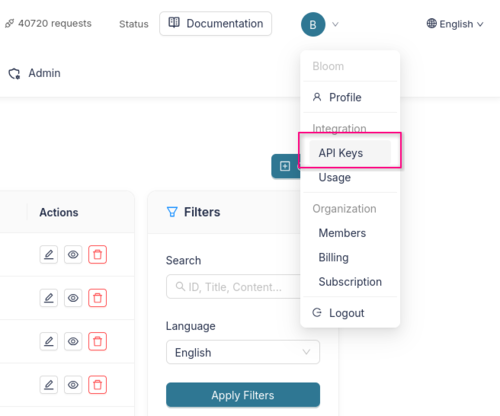
ダッシュボードの右上にあるプロフィールアイコンをクリックします。ドロップダウンメニューが表示されます。Integrationセクションの下にあるAPI Keysをクリックしてください。
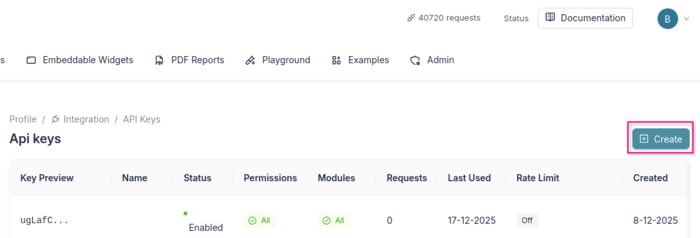
API Keysの概要ページが表示されます。ナビゲーションバーに現在のパスが表示されます: Profile > Integration > API Keys。右上のCreateボタンをクリックして新しいキーを作成します。
キーを作成する
作成ページには、いくつかのセクションを含むフォームが表示されます:
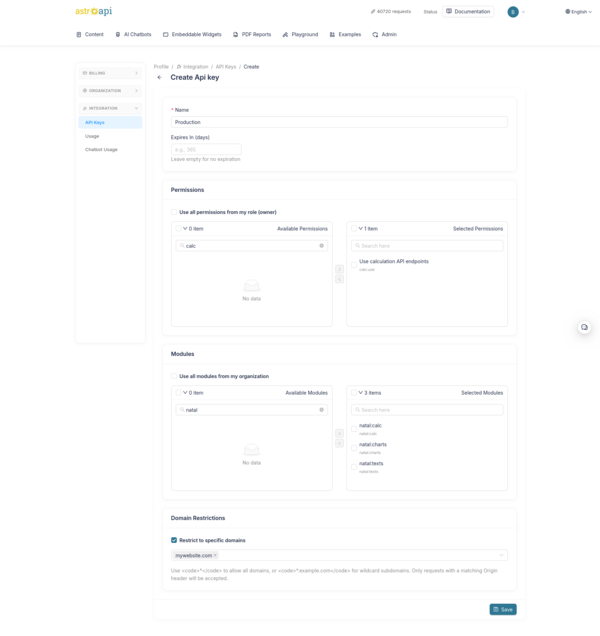
- Name - キーに分かりやすい名前を付けます(例: 「My Astrology App」や「Production」)。
- Expires In (days) - 任意で有効期限を設定します。キーを無期限にしたい場合は空のままにしてください。
- Permissions - キーがアクセスできるAPI機能を選択します。このチュートリアルでは、少なくとも計算権限(
calc)が必要です。シンプルにするために**「Use all permissions from my role」**にチェックを入れることもできます。 - Modules - キーが使用できるモジュールを選択します。このチュートリアルでは、ネイタルモジュール(
natal:calc、natal:charts、natal:texts)を選択してください。**「Use all modules from my organization」**にチェックを入れてすべてを許可することもできます。 - Domain Restrictions - これは重要です。クライアントサイドのウェブページなので、API keyはページのソースコードから誰でも見ることができます(ブラウザの開発者ツールで確認可能)。そのため、自分のドメインのみに制限する必要があります。ウェブサイトのドメイン(例:
mywebsite.com)を入力すると、そのドメインからのリクエストのみが受け入れられます。こうすれば、誰かがキーをコピーしても、自分のサイトでは使えません。ローカル開発では一時的に*を使用できます。
Saveをクリックすると、新しいAPI keyが表示されます。コピーして安全な場所に保管してください。完全なキーを再度確認することはできません。
ステップ2: HTMLページを作成する
テキストエディタを開き、astrology.htmlという新しいファイルを作成します。生年月日の詳細を入力するフォームを持つ基本的なページから始めます:
<!DOCTYPE html>
<html lang="en">
<head>
    <meta charset="UTF-8">
    <meta name="viewport" content="width=device-width, initial-scale=1.0">
    <title>My Astrology App</title>
    <style>
        body {
            font-family: Georgia, serif;
            max-width: 800px;
            margin: 0 auto;
            padding: 2rem;
            background: #f5f0e8;
            color: #1a1a1a;
        }
        h1 { text-align: center; }
        form {
            background: white;
            padding: 2rem;
            border-radius: 8px;
            margin-bottom: 2rem;
        }
        label { display: block; margin-bottom: 0.5rem; font-weight: bold; }
        input, select {
            width: 100%;
            padding: 0.5rem;
            margin-bottom: 1rem;
            border: 1px solid #ccc;
            border-radius: 4px;
            font-size: 1rem;
        }
        button {
            background: #ba9a63;
            color: white;
            border: none;
            padding: 0.75rem 2rem;
            font-size: 1rem;
            border-radius: 4px;
            cursor: pointer;
        }
        button:hover { background: #a8894f; }
        .results { background: white; padding: 2rem; border-radius: 8px; }
        .planet-row {
            display: flex;
            justify-content: space-between;
            padding: 0.5rem 0;
            border-bottom: 1px solid #eee;
        }
        .planet-name { font-weight: bold; }
        .planet-sign { color: #ba9a63; }
        #chart-image { text-align: center; margin: 2rem 0; }
        #chart-image svg { max-width: 100%; height: auto; }
        .horoscope-box {
            background: #f9f3e5;
            padding: 1.5rem;
            border-left: 4px solid #ba9a63;
            border-radius: 0 8px 8px 0;
            margin-top: 1.5rem;
            line-height: 1.8;
        }
        .loading { text-align: center; color: #6b6b75; font-style: italic; }
        .hidden { display: none; }
    </style>
</head>
<body>
    <h1>✨ My Astrology App</h1>

    <form id="birth-form">
        <label for="name">Your Name</label>
        <input type="text" id="name" placeholder="e.g. Anna" required>

        <label for="date">Date of Birth</label>
        <input type="date" id="date" required>

        <label for="time">Time of Birth</label>
        <input type="time" id="time" required>

        <label for="city">City of Birth</label>
        <input type="text" id="city" placeholder="e.g. Amsterdam" required>

        <button type="submit">Calculate My Chart</button>
    </form>

    <div id="results" class="results hidden">
        <!-- Results will appear here -->
    </div>

    <script>
        // We'll add our code here in the next steps
    </script>
</body>
</html>
ファイルを保存してブラウザで開いてください。生年月日の詳細を尋ねるきれいなフォームが表示されるはずです。まだ何も動作しません。次のステップで修正しましょう。
ステップ3: 出生地を検索する
誰かが「Amsterdam」と入力したとき、それを緯度と経度の座標に変換する必要があります。AstroAPIにはそのためのジオコーディングエンドポイントがあります:
const API_KEY = "your-api-key-here";
const BASE_URL = "https://api.astroapi.cloud/api";
API keyを保護する: これはクライアントサイドのウェブページなので、ページソースを閲覧すれば誰でもAPI keyを見ることができます。ダッシュボードでDomain Restrictionsを設定している限り問題ありません(ステップ1参照)。APIは許可リストにないドメインからのリクエストを拒否するため、キーをコピーしても使えません。
では、関数を書いていきましょう。まず、場所の検索から:
async function findLocation(cityName) {
    const response = await fetch(
        `${BASE_URL}/geocoding/search?q=${encodeURIComponent(cityName)}`,
        { headers: { "X-Api-Key": API_KEY } }
    );
    const data = await response.json();

    // The API returns a list of matching places.
    // We'll use the first result.
    const place = data.data[0];
    return {
        latitude: place.latitude,
        longitude: place.longitude,
        timezone: place.timezone,
        name: place.name
    };
}これにより「Amsterdam」は{ latitude: 52.37, longitude: 4.89, timezone: "Europe/Amsterdam", name: "Amsterdam" }に変換されます。チャート計算に必要な情報そのものです。タイムゾーンは重要で、AstroAPIがローカルの出生時刻を世界時に正しく変換するために必要です。
ステップ4: ネイタルチャートを計算する
次に、出生データをAstroAPIに送信して、すべての惑星位置を取得しましょう:
async function calculateChart(birthDate, birthTime, latitude, longitude, timezone) {
    const response = await fetch(`${BASE_URL}/calc/natal`, {
        method: "POST",
        headers: {
            "Content-Type": "application/json",
            "X-Api-Key": API_KEY
        },
        body: JSON.stringify({
            dateTime: `${birthDate}T${birthTime}:00`,
            location: { latitude, longitude, timezone },
            houseSystem: "placidus",
            includeReadableEntities: true
        })
    });

    return await response.json();
}dateTimeはISO文字列(例: "1990-06-15T14:30:00")として送信され、locationにはタイムゾーンが含まれるため、APIがローカルの出生時刻を正しく解釈できます。レスポンスにはチャートに関するすべての情報が含まれます: 各惑星の位置、所属する星座、所属するハウス、そして惑星間のすべての幾何学的関係(アスペクト)。
ステップ5: 結果を表示する
ここからが楽しい部分です。生のAPIデータを視覚的に魅力的なものに変えましょう。惑星の位置の表と、太陽星座、月星座、上昇星座の「ビッグスリー」を表示します。ほとんどの人が最も気になるポイントです:
function displayChart(chart, personName) {
const points = chart.data.points;
const houses = chart.data.houses;
// Find the "big three"
const sunSign = points.sun.signTitle;
const moonSign = points.moon.signTitle;
const risingSignId = houses.cusps[0].sign;
const risingSign = risingSignId.charAt(0).toUpperCase() + risingSignId.slice(1);
let html = `
<h2>${personName}'s Birth Chart</h2>
<div style="text-align:center; margin-bottom:2rem;">
<p style="font-size:1.2rem;">
☀️ Sun in <strong>${sunSign}</strong> ·
🌙 Moon in <strong>${moonSign}</strong> ·
⬆️ Rising <strong>${risingSign}</strong>
</p>
</div>
<h3>Planetary Positions</h3>
`;
// Build a row for each planet
const planetKeys = ["sun", "moon", "mercury", "venus", "mars",
"jupiter", "saturn", "uranus", "neptune", "pluto"];
for (const key of planetKeys) {
const planet = points[key];
if (!planet) continue;
html += `
<div class="planet-row">
<span class="planet-name">${key.charAt(0).toUpperCase() + key.slice(1)}</span>
<span class="planet-sign">${planet.signTitle} ${planet.degreesInSign.toFixed(1)}°</span>
<span>House ${planet.houseNumber}</span>
</div>
`;
}
document.getElementById("results").innerHTML = html;
document.getElementById("results").classList.remove("hidden");
}APIは惑星を惑星IDでキー付けされたオブジェクトとして返します(例: points.sun、points.moon)。各惑星にはsign(例: "gemini")、signTitle(表示名、例: "Gemini")、degreesInSign(その星座内の位置)、houseNumberがあります。上昇星座(アセンダント)は第1ハウスカスプのsignプロパティから直接取得できます。
ステップ6: ビジュアルなチャートホイールを追加する
ネイタルチャートは、クラシックな円形チャートホイールがあると本当に生き生きとします。AstroAPIはどのサイズでもくっきりと表示されるSVG画像としてこれを生成します:
function displayChartImage(chartUrl) {
    const chartDiv = document.createElement("div");
    chartDiv.id = "chart-image";
    chartDiv.innerHTML = `<h3>Your Chart Wheel</h3><img src="${chartUrl}" alt="Natal Chart" style="max-width:100%; height:auto;">`;
    document.getElementById("results").appendChild(chartDiv);
}ネイタルチャートAPIのレスポンスには、SVGチャート画像のURLを含むchart.urlフィールドが既に含まれているため、別途リクエストする必要はありません。そのURLを<img>タグに渡すだけで、12星座、ハウス、惑星の位置、アスペクトラインを含むチャートホイールを表示できます。
PNG画像が必要な場合 - 例えば、SNSで共有するため?URLの.svg拡張子を.pngに変更するだけです。
ステップ7: デイリーホロスコープを表示する
その人の太陽星座に基づいた今日のホロスコープを表示して、パーソナルなタッチを加えましょう:
async function displayHoroscope(sunSign, sunSignTitle) {
    const today = new Date().toISOString().split("T")[0];

    const response = await fetch(
        `${BASE_URL}/horoscope/daily/${today}?sign=${sunSign}&language=en`,
        { headers: { "X-Api-Key": API_KEY } }
    );

    const data = await response.json();
    const signName = sunSignTitle;

    const horoscopeDiv = document.createElement("div");
    horoscopeDiv.innerHTML = `
        <h3>Today's Horoscope for ${signName}</h3>
        <div class="horoscope-box">${data.data.text}</div>
    `;
    document.getElementById("results").appendChild(horoscopeDiv);
}ホロスコープエンドポイントはURLに今日の日付を受け取り、クエリパラメータとして星座を受け取ります。ホロスコープは複数の言語で利用可能です。language=enをlanguage=nlでオランダ語、language=esでスペイン語、language=frでフランス語などに変更するだけです。
ステップ8: すべてを連携させる
フォームをすべての関数に接続しましょう。以下のコードを<script>セクションに、前のステップのすべての関数の後に追加してください:
const API_KEY = "your-api-key-here";
const BASE_URL = "https://api.astroapi.cloud/api";

document.getElementById("birth-form").addEventListener("submit", async (e) => {
    e.preventDefault();

    const name = document.getElementById("name").value;
    const date = document.getElementById("date").value;
    const time = document.getElementById("time").value;
    const city = document.getElementById("city").value;

    // Show a loading message
    const results = document.getElementById("results");
    results.innerHTML = '<p class="loading">Calculating your chart...</p>';
    results.classList.remove("hidden");

    try {
        // 1. Find the coordinates and timezone for the birth city
        const location = await findLocation(city);

        // 2. Calculate the natal chart
        const chart = await calculateChart(date, time, location.latitude, location.longitude, location.timezone);

        // 3. Display the planetary positions
        displayChart(chart, name);

        // 4. Add the visual chart wheel using the URL from the API response
        if (chart.data.chart?.url) {
            displayChartImage(chart.data.chart.url);
        }

        // 5. Show today's horoscope based on the Sun sign
        const sunSign = chart.data.points.sun.sign;
        await displayHoroscope(sunSign, chart.data.points.sun.signTitle);

    } catch (error) {
        results.innerHTML = '<p style="color:red;">Something went wrong. Please check your API key and try again.</p>';
    }
});
ブラウザでファイルを開き、生年月日と都市を入力して「Calculate My Chart」をクリックしてください。数秒以内に、完全なネイタルチャートデータ、美しいチャートホイール、パーソナライズされたホロスコープが表示されます。すべてAstroAPIによって提供されています。
さらに先へ: 相性、月の満ち欠けなど
占星術アプリが動作するようになったので、次に追加できる機能をいくつか紹介します:
恋愛の相性 - シナストリーエンドポイントを使用して、2つの出生チャートを比較します。どの惑星が調和的なアスペクト(トライン、セクスタイル)を形成し、どれが緊張(スクエア、オポジション)を生み出すかを表示します。「相性診断」機能に最適です。
月の満ち欠けトラッカー - ムーンフェーズエンドポイントは、現在の月相、照度パーセンテージ、月の出・月の入りの時刻を返します。サイドバーウィジェットやデイリーアップデートに最適です。
トランジットアラート - トランジットは、出生チャートと比較して惑星が現在どこにあるかを示します。これを使って「今日のあなたのチャートで起こっていること」機能を構築できます。例えば、「土星がMC(天頂)を通過中で、キャリアの躍進の時期です」など。
数秘術 - 生年月日と名前からライフパスナンバー、表現数、パーソナリティナンバーを計算します。占星術データの素敵な補完になります。
多言語サポート - テキストベースのすべてのエンドポイント(ホロスコープ、解釈)は複数の言語をサポートしています。langパラメータを渡すことで、グローバルなオーディエンス向けに構築できます。
サーバーサイドプロキシ - 本番アプリでは、API呼び出しを小さなバックエンドサーバーに移すことを検討してください。こうすればAPI keyはサーバーに留まり、ユーザーに一切公開されません。Domain Restrictionsは良い最初の防御策ですが、プロキシを使えば完全な制御が可能です。
完全なAPIを探索する
ここで紹介した内容はほんの始まりに過ぎません。完全なAPIドキュメントでは、cURL、JavaScript、Pythonのリクエスト例とともに、すべてのエンドポイントが詳しく説明されています。
構築を始める準備はできましたか?無料アカウントを作成して、今すぐAPI keyを取得しましょう。